W-2 Register
 .
.  Show me.
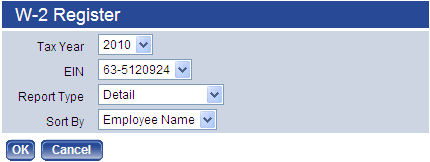
The Summary Report Type lists taxable wages (Box 1) and federal taxes (Box 2) for each employee.
The Detail Report Type lists all W-2 information (all boxes) for each employee. It also includes totals that may be compared to the 941s for the year. This comparison will verify whether the grand total taxes and wages reported on the W-2s match the amounts paid during the year.
The W-2 Register also may be used in conjunction with the Payroll History Report and the Earnings History Report to reconcile individual employee amounts.
The User Adjustments Report Type lets you see adjustments that were made to an employee's W-2 file since the W-2 data last was created. This option is helpful for reviewing any discrepancies between the actual earnings history (including checks, voids and adjustments) and the current W-2 figures. Changes would be made from the W-2 Employee List.
You may sort the summary and detail registers by employee name or by department.
Fields
| Field | Description |
|---|---|
| Tax Year | Tax year being reported. The current year is the default selection. |
| EIN | Employer Identification Number for which the register is being run. This entry defaults from the W-2 Employee List page. |
| Report Type | Determines whether the register will be run in Detail or Summary or whether it will be run to show User Adjustments only. |
| Sort By | Determines whether the register will be sorted by Employee Name or Department. |
After making your entries, click OK to generate the register and send it to myReports.